Course Selection
Meeting with your advisor is just one step in the course registration process. Before that, try to pick out a schedule for your next semester. Don't come to your meeting unprepared!
- First of all, if you're one of my advisees, please make sure you're in my Slack channel (#advising-kyle). If not, reach out to me right away so I can put you in there!
- If you're trying to figure out when I'm free, I have a regular weekly schedule. Just show up during my office hours or reach out on Slack if you have any questions!
- Pre-req Chart, a flowchart showing course pre-requirements.
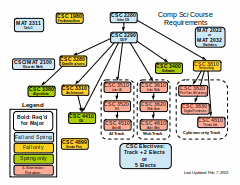
- FSC Academic Catalog, with a PDF that has all the academic class and program descriptions and requirements.
- Weekly Schedule Planning Grid, a form-fillable PDF that you can type in (or print and fill out by hand) to plan your schedule. I ask my advisees to fill one of these out each semeseter. (I stole this from the FSC website.) I also have paper versions of these outside my office.
- How-To-Register Video, stolen directly from the portal menu.
- FSC Registrar's Forms and Documents.
- The Registrar's Office is located in the Thad Buckner Building
- If you want to retake a class to go for a better grade, you won't be able to register until you email the registrar and ask for grade forgiveness for that course. Email them and mention that you want to register to retake a course. (I think you need to have a D or F in that class already, but I might be mistaken on this.)